Political Fundraising with Paypal
 Because PayPal is simple to set up and administer, many of our clients are interested in using PayPal for political fundraising.
Although it does not specialize in political contributions, PayPal does provide resources and instructions for users who want to accept political donations online. These resources are helpful to any local candidates who want to raise money online. There’s even a section for collecting mobile donations.
There are a few ways to process contributions via PayPal. The most common method is to process single donations through generated donation buttons and links. To enable donors to contribute to your campaign or PAC on a regular schedule, you can implement PayPal recurring donations by utilizing the Subscribe button. PayPal’s Custom Payment Pages feature gives you the ability to tailor your payment pages to the style of your political organization’s website, providing donors with a seamless payment experience.
Here are the basic steps for accepting campaign contributions through PayPal:
1) Create a campaign bank account.
2) Sign up for a PayPal Business Account.
a. Select Nonprofit as the business type
b. Select Political as the subcategory
3) Confirm that your political campaign account is a nonprofit.
You will need to submit a tax letter from the IRS and a bank statement or voided check in the name of your organization, along with your PayPal email account and contact details, to compliance@paypal.com.
4) Add a Donate button to your campaign’s website
Use the button designer on PayPal.com to create your button, then simply copy and paste the resulting code into your site.
Do open your campaign PayPal account early, as there is some verification to complete before your account can be set up and approved.
Note that your organization is responsible for gathering donor information, such as employer and occupation, and obtaining permission from donors before sending future marketing outreach.
Unfortunately, PayPal does not provide an easy way to collect employer and occupation information from the donor. This information is required for every Federal race and many other political elections. This lack of flexibility in information gathering and setup makes PayPal bad for political campaigns and political action committees.
Also, if you are in a time crunch, it can take up to 3 to 5 days to have your PayPal account approved.
For these reasons, and because it lacks important online tools, we do not recommend PayPal as a donation processor for campaigns. There are other political fundraising websites and services that are, frankly, better at doing the job.
Vendors that deal specifically in political donations have several advantages. Here are a few features they provide:
- They provide easier setup. You’ll need to have your bank account and organization paperwork ready.
- You can accept contributions directly through your website with embedded forms. A bit of code is provided to do this.
- Short links to donation forms can be added to campaign material, social media, or email.
- You can take donations through your campaign’s Facebook page.
- You can create and track the success of multiple donation forms for different fundraising initiatives.
- Donors can make recurring contributions throughout the election season.
- You can have direct deposit of your funds into your campaign bank account.
With all that said, Online Candidate’s built-in donation form DOES allow for PayPal integration. This form will collect required data for you before sending the donor to PayPal to complete the transaction. It essential makes the donation a two-step process. Because the donation process is not seamless (like other donation services provide), you have a higher chance of incomplete transactions.
Additional Resources:
- Political Fundraising with PayPal [Guide]
- Crowdfunding Your Election Campaign
- Political Donation Solutions – PayPal
Online Candidate campaign websites can be integrated with PayPal, Raise The Money, or any other online fundraising service. Learn more about our political website packages.
Generating an Online Signature
 Many candidates use the home page of their campaign website to personally address voters or constituents. It’s a nice technique, but what kills the illusion of an online ‘letter’ is the lack of a handwritten signature. Here are a few ways to generate a realistic-looking signature for your web pages.
The first and most realistic method is to write out an actual signature on paper, scan it, crop the image, upload it and add it to your web page. The advantage to this is that the signature is actually yours. If you do this, you’ll want to write out your name in marker, rather than pen, in order to get a more bold and legible sample.
Another method is to use a website, such as mylivesignature.com , to generate a signature image file by picking a font, size, background color and image angle. Once you have created the signature, you can download it and re-upload it for use on your website.
Does it matter if you use a signature that is not in a candidate’s actual handwriting? Hard to say. Perhaps if the signature file is the candidate’s full name, use a scan of his or her actual signature. It might not matter as much if you are just using a first name. If you use a tool to generate a signature, try using a non-cursive font. No one is going to mistake a generated signature for a real one, but using a graphic like this adds a nice touch to the page.
Visit our Download Store, featuring our Online Candidate Letter Templates, Slogans E-Book, Campaign Forms and the Running for Office as an Online Candidate E-book!
Dealing With The Local Media When Running for Office
 The media, including newspapers, radio and television can be a great asset or a great big pain when running for local office. Often the only source of information local voters get about a candidate comes from the local media. Therefore, it’s important to set your media goals early and learn to make the media your friend.
Reach out to local media early. Find out what reporters cover your area and send them a quick introduction and contact information. Determine who your primary media contacts will be. A campaign press kit can come in handy. If the campaign is underway, be sure to have press kits in print and available online for download. Anything you can do to make a journalist’s job easier is helpful.
Practice on being a quotable politician. The candidate should have a set of practiced, stock answers for the most common questions. It also helps to practice ahead of time answering non-standard questions. Short, strong statements make the best quotes for media coverage.
Be aware of lead times. Contact the media when you are beginning your planning for an event. Don’t send duplicate copies of your news releases to different people at the same media organization. Follow up within a day or so to make sure the announcement was received. If it’s a photo opportunity, provide the dates and times, and prepared to give directions.
The candidate or a representative from the campaign should be available to answer questions from the media. It’s important to return requests promptly in order to respond to new events. If you don’t make a deadline, your response could become the default, “Candidate was unavailable for comment.” At best, it can make your campaign look inaccessible. At worst, it could look as if your campaign is hiding something.
“Off the record” doesn’t really exist. Media questions should be answered as if everything you say is on the record and will be reported. That includes any informal conversation before and after the formal interview.
If the media makes an error in a story, stay calm. If it’s a minor point, don’t worry about it. If it’s a major error, inform the reporter of the error (politely) and request a correction. If that doesn’t work, try contacting the reporter’s editor or write a letter to the editor or station manager. If you overreact, you run the risk of permanently damaging your relationship with that media outlet.
Your campaign will have enough obstacles – you won’t want the media to become one as well.
Create a Press Kit with our brochure templates! This package includes the following Microsoft Word templates: Tri-Fold Brochure, Newsletter, Rack Card, Post Card Letterhead and Press Release Templates.
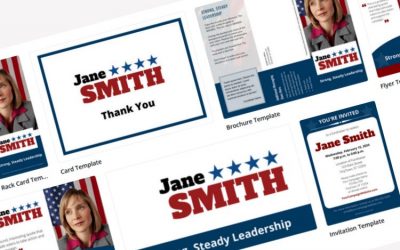
Tips for Creating a Great Campaign Brochure
When putting together your campaign brochures, you want to put your best foot forward. Your brochure may be the first, last, and only time you will reach a voter. Here are tips to creating an effective election brochure that will make a good impression on your target voter.
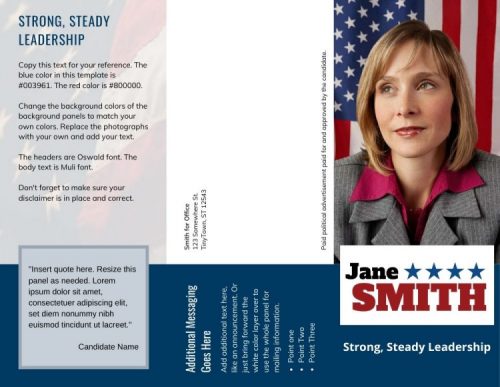 Sample Brochure Layout – Click For More Political Brochure Design Examples
Write out your content, while keeping in mind the amount of space you have to work with. Odds are you will start with way too much text, and you’ll need to cull down the material.
That’s fine, because you’ll want your copy to be as lean and to-the-point as possible.
Keep in mind the overall design and layout of the brochure or political pamphlet. For example, if your piece is tri-fold brochure mailer, two-thirds of one side will be for address information and the ‘cover’ on the other side.
In the brochure copy itself, try to:
- Keep to one idea per paragraph.
- Use short sentences.
- Use bullet points where possible to free up as much white space as possible.
- Use headers and divide the text into sections (About the Candidate, Issues, Voting Information/Election Date…)
- Include a call to action. This is usually a reminder to vote on Election Day or perhaps a statement about the candidate or the opposition.
- These guidelines apply for both candidate and political party pamphlets, election leaflets, campaign handouts and flyers.
What makes a good brochure design?
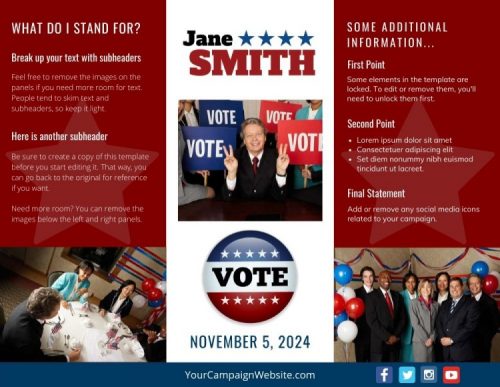 When designing political campaign brochures, keep the layout simple. Be sure the main colors of the brochure match your other campaign materials, yard signs, and website. Script fonts should be generally avoided for readablity. Keep in mind that using more colors adds to the cost of printing.
Make sure the front panel is attention-getting
The front of your leaflet should communicate your main point clearly and succinctly. If it doesn’t, your carefully-crafted literature may end up the recycling bin, unread. You may want to use a question or powerful statement on the front of the piece to draw attention.
Photographs provide powerful visual elements
Political brochures should include at least one photo of the candidate. Typically, a professionally-shot candidate photo should appear on the cover, along with an ‘action shot’ inside. All the photos should make the candidate look good with proper dress and backgrounds. The last thing you want potential voters to do is to scrutinize the candidate’s fashion sense or the corporate logo of some item in the shot’s background.
A picture can tell a thousand words; charts and graphs can do the same
Your graphics should be simple in design and clearly illustrate a point. A simple explanation under the chart should be all you need to make your point. Images for the sake of taking up space only serve to distract from your piece.
As your election pamphlet design is finalized, it’s likely that you (or the designer) will need to adjust the different elements to make everything fit and flow properly. If there is too much text, the font size may need to be adjusted or the graphics or photos re-sized. You may need to further condense your copy.
A cramped brochure looks bad and is less likely to be read.
Put together your content
You have limited space to place your content. The purpose of your brochure will determine what, exactly, the content will contain. Writing an introductory piece to voters is different than a get out the vote or an opposition attack piece.
If the piece is to convince voters why you should be elected, you should spell it out for them.
- List your experience and offices you previously held as a candidate.
- Briefly include your accomplishments and activities.
- Keep your message short and to the point.
- Balance out the copy with additional testimonials or endorsements.
If you are writing about a particular issue, keep your points bulleted and short. You may want to include relevant quotes from others who have a stake in the issue or legislation.
Include additional campaign information.
- Your campaign website
- Contact information
- Email address
- Social media channels
Remember, you have limited space. Don’t stuff too much text. Plenty of space in your layout helps makes your brochure easier to read.
Finally, proofread the brochure for misspellings or grammatical errors
Have a few people review the piece for readability. Preferably, they should be people who were not involved in creating the print piece. That way they have an objective point of view.
Tip: From professional experience we’ve found that it’s better to limit the number of people involved in writing and editing the brochure. Campaign material created by committee tends to be unfocused, as the brochure, flyer or pamphlet ends up trying to cover too many points in a single piece.
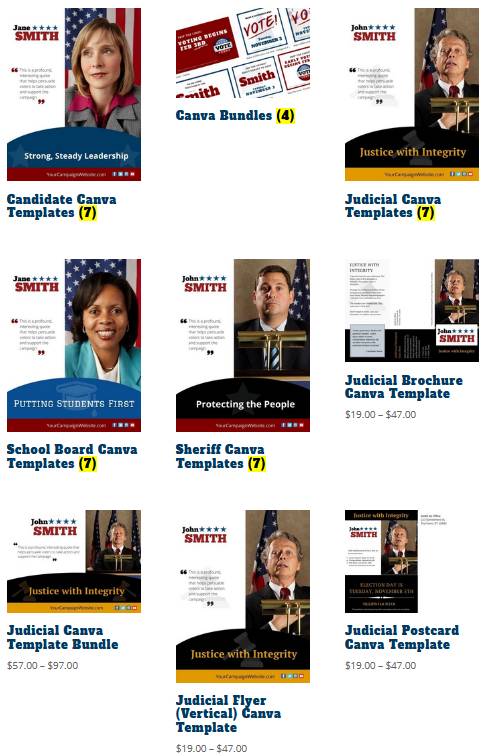
Canva political template examples from our download store.
We have versions for local candidates, school board candidates, judges and sheriffs.
Printing your campaign brochures
If you are having an outside company print your brochures or pamphlets, check their printing requirements and be sure to provide everything they need. They may need a particular format and image resolution. Images and design elements should beat least 300 dpi.
Tip: Web images are 72 dpi, so don’t use graphic elements from your website in a print piece.
The post office can inform you about requirements that must be met for mailing brochures. For example, are there are specific size or bulk mail requirements? The USPS considers election mail as any item mailed to or from authorized election officials or organizations.
Finally, upload a digital version of the election brochure to your campaign website so that it is available for others to download, share and print. Don’t forget to add it to your online press kit.
Bonus Tip: If you are looking for campaign literature examples, look no further than your mailbox. Create a political swipe file and save the good brochures, mailers and pamphlets sent by other candidates as examples for inspiration.
Free up your valuable time! Our easy-to-customize Canva Political Templates will add a professional edge to your campaign brochures and handouts. Online Candidate website clients have access to FREE editable social media graphics.

WordPress Political Website Templates
Online Candidate now offers WordPress political website templates for download by customers who are not Online Candidate® clients.
These themes are designed for candidates or political parties with the resources to build their own websites but who want a good design starting point. They are also useful for campaigns or organizations that already have web hosting or are looking to update their site design.
The templates are Divi child themes for WordPress, designed to be easily edited and customized. You can also add plugins for additional functionality.
All these themes are sold through our companion site, OnlineCandidateWP.com.
Please note that the templates below are NOT part of our Online Candidate political website platform. They do NOT include site hosting or any built-in Online Candidate tools or resources. We do not offer additional design or hosting services for these products.
Our political website template features include:
- 10 full page layouts – including pre-built home, events, issues, endorsements, donate, about and contact pages.
- Editable global header and footer sections, along with main menu options.
- Email signup, volunteer and endorsement forms included.
- 404, search results, and category archive templates.
- Stock images images included, suitable for personal and commercial use.
- Library of design elements to edit and reuse across pages.
- Fully responsive design so you site looks good on all devices, desktop and mobile.
We offer several layouts for different elected positions. They are designed to help save development time and costs. You are free to edit the designs in any way you choose.
Political Candidate WordPress Template
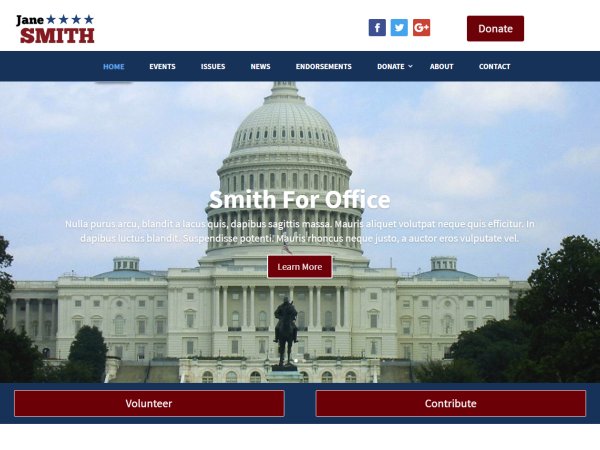
Cleanly designed and fully responsive, this Divi child theme is specifically designed for political campaigns. It can serve a number of purposes, such as for an important election, a candidate’s personal website, or a website for a political party. The default design color scheme is red, white, and blue, but you can change those colors if you choose.
Get started with your political website easily with a great template designed by professional designers. They are suitable for all types of offices, from local, state, to federal positions. Everything from city council, to mayor, supervisor and even representative and senate races.
All content from the site demo is included, including built-in forms and the page layout. Little to no extra page development is needed. Every page in the demo has a corresponding template. Divi sections are saved to the library to make page updates simple.
Judicial Website Theme

Clean design and fully responsive, this Divi child theme is specifically designed for judicial elections and campaigns for judges. All of the site content that appears in the demo is included. Little to no additional page development is needed. Swap out demo text and images and configure the settings to your liking. This gives you control over the design and appearance of your site. It’s also suitable for use for attorneys and law firm websites.
View Judicial Wordpress Website Template
Sheriff Website

Fully responsive with a clean black and white layout, this template is specifically designed for sheriff and law enforcement campaigns. As with our other WP themes, all demo content is included with installation. Little to no extra page development is needed. You are free to swap out demo material and configure the site settings and images to your liking.
View Sheriff Wordpress Template
School Board Election Theme
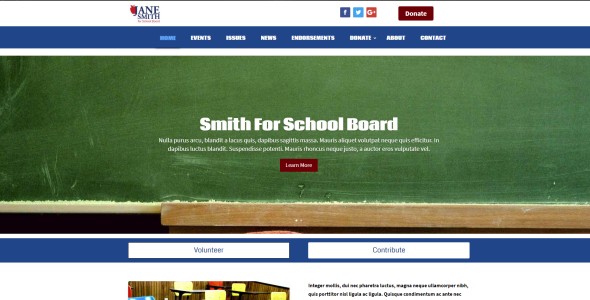
Blue and red, this layout is specifically designed for school board elections or can be used for actual school websites. All content, images and forms are included. School board candidates have the opportunity to fill their issue pages with information that can help them build support and win their election.
View School Board Website Template
All of these political website templates are designed to help free up time and resources for candidates and political organizations. With the included pages, navigation, built-in forms and content layout, most of the design work has already been done for you!
Full step-by-step instructions are included so you can get a fresh WordPress installation looking like the site Demos in about 15 minutes.
Again, these templates are Divi child themes. You need to have an installation of the paid Divi theme for them to work.
Divi, one of the most popular WordPress themes, is a drag and drop page builder that makes designing your site easy. It comes with 40+ pre-made layouts which you can quickly adjust to suit your needs. Want to go beyond the included layouts? Use the intuitive Divi Builder, which includes features like full-width rows, custom headers & footers, multiple blog layouts and more.
If you are looking for a simple-to-use alternative to WordPress? Consider using the Online Candidate website platform.
Get the Most From Your Campaign Yard Signs
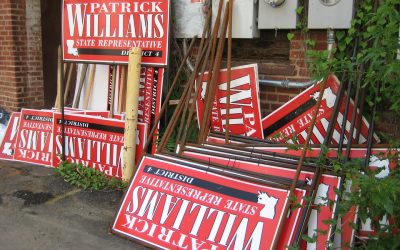
 Campaign yard signs are typically the first form of advertisement voters see from a political campaign. Having a successful sign placement strategy is vital to make sure the money spent on signs has a substantial impact on the voters.
Name recognition is a high priority for candidates and political lawn signs are very effective if used properly.
Use voting area maps to determine sign placement
Acquire a map of the voting area. Useful maps are typically available from government planning and printing offices. Often, the maps can be downloaded off the internet from government websites. These maps are useful in determining important road intersections and busy traffic locations where campaign yard signs should be placed.
Most state and county transportation departments provide maps and data indicating the average daily traffic numbers in the area. Mapping software is also available which provides census statistics plotted on political districts. The software makes it easier to locate the important voter blocs.
Follow the rules in using campaign signs
Cities and counties have their own rules regarding signs, including the placement of them. Make sure everyone involved with the campaign yard signs is aware of the rules.
For example, most areas require that election lawn signs be placed at least ten feet from the road. Also, some homeowner’s associations have rules and limitations concerning political signs.

Finding good locations for your signs
An effective initial strategy is to contact your political party, retired politicians and candidates from the same political party who are campaigning in the district and ask them for names of supporters who allow political lawn signs on their property.
High traffic areas are obvious locations for campaign yard signs. It provides a lot of visibility to those who pass by. Intersections are also good because signs are noticed by stopped motorists.
There may be specific private properties that have high visibility. Have volunteers call those property owners and ask for permission to place a sign on their property.
Reducing visual blindness
After a while, voters driving by the same signs at the same locations tend to not pay attention to the campaign lawn signs. Campaigns can shake things up by exchanging a large sign at a location for an existing small sign. Adding more signs to the location can also grab the attention of voters.
Another useful strategy is to place some of your bigger election signs next to your competitor’s small signs. It has the effect of making the candidate with the big sign look more powerful and important.
Placing a vast number of election lawn signs in the candidate’s voting area is an effective strategy for increasing name recognition, however if too many signs are crammed in a specific area, voters can become annoyed by the bombardment of signs, and it can have a negative affect on them.
Even in these days of high technology, campaign yard signs are an effective way of increasing name recognition and improving the chances of winning the election.
For more information on campaign signs and custom yard signs, visit CampaignPros.com.
Looking for professional logo templates for your signage? Check out our selection.
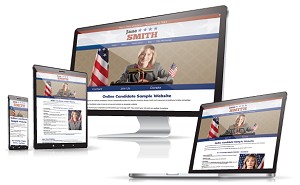
Online Candidate makes it easy to launch your political website and build your online presence.
Free Download
Get our Free Digital Political Kickstart Guide today.